


A UV printer is a digital inkjet printer that prints UV-curable ink onto a surface and uses ultraviolet LED light to cure the ink almost immediately. Unlike a conventional desktop printer that mainly prints on paper, a UV flatbed printer can print directly onto many rigid products such as acrylic, plastic, wood, glass, metal, phone cases and promotional items.
For a custom printing business, the easiest way to understand the difference is this:
UV printing is mainly direct-to-object printing for hard goods, while DTF printing is a transfer process designed mainly for apparel and textile products.
That difference affects the printer, ink, workflow, products you can sell and the equipment you need.
What Is UV Printing?
UV printing is a form of digital inkjet printing that uses specially formulated UV-curable ink.
The printhead deposits tiny droplets of ink onto the object. UV LED lamps then expose the fresh ink to ultraviolet light, triggering a curing reaction that turns the liquid ink into a stable printed layer.
This is why saying UV ink simply “dries” can be misleading. In conventional printing, drying may depend on evaporation or absorption. With UV printing, the ink is primarily cured by UV energy.
The result is a process that can produce sharp, full-color graphics directly on many non-paper surfaces.
A typical UV printer may use:
- CMYK color ink
- White ink
- Clear varnish, depending on the printer configuration
- UV LED curing lamps
- Piezoelectric inkjet printheads
- RIP software for controlling color and print layers
These capabilities make UV printing particularly useful for customized hard goods, short production runs and products that would be difficult to decorate with conventional paper-based printing.
How Does a UV Printer Work?
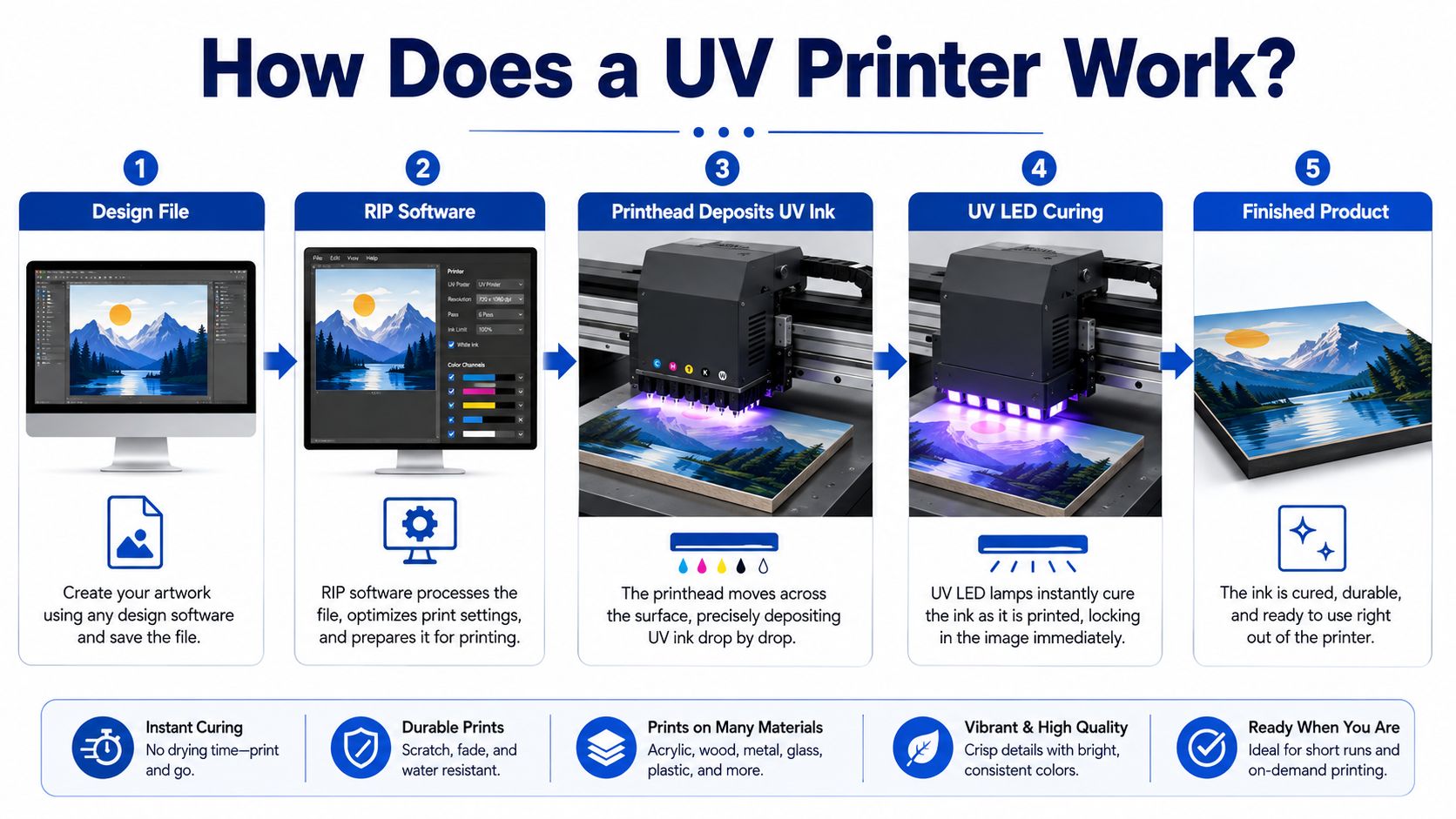
Although UV printers vary in size and configuration, the basic process normally follows five stages.
1. Prepare the Artwork
The process begins with a digital design.
Artwork may include:
- Logos
- Photographs
- Illustrations
- Personalized names
- Product graphics
- Variable customer designs
The file should be prepared at the correct size and resolution before printing.
2. Process the File in RIP Software
A UV printer normally uses RIP software to convert the artwork into information the printer can use.
Depending on the machine and ink configuration, RIP software can control:
- CMYK color output
- White ink layers
- Varnish layers
- Resolution
- Print passes
- Ink density
- Image placement
- Multiple printing layers
White ink control is especially important when printing onto transparent or dark-colored products.
3. Position the Object
The product is placed on the printer bed.
On flatbed UV printers, the operator must consider:
- Object size
- Object thickness
- Printing height
- Surface flatness
- Positioning accuracy
- Fixture or jig requirements
For repeat products such as phone cases, keychains or promotional items, a jig can help position several products consistently.
4. Print the UV Ink
The printhead travels over the object and deposits extremely small droplets of UV ink according to the RIP data.
Unlike DTF printing, the design normally goes directly onto the final object rather than onto PET transfer film first.
5. Cure the Ink with UV LED Light
UV LEDs mounted close to the printhead expose the ink to ultraviolet light during or immediately after printing.
The ink cures rapidly, so the product usually comes out of the printer ready for handling without a conventional long drying stage.
What Ink Does a UV Printer Use?
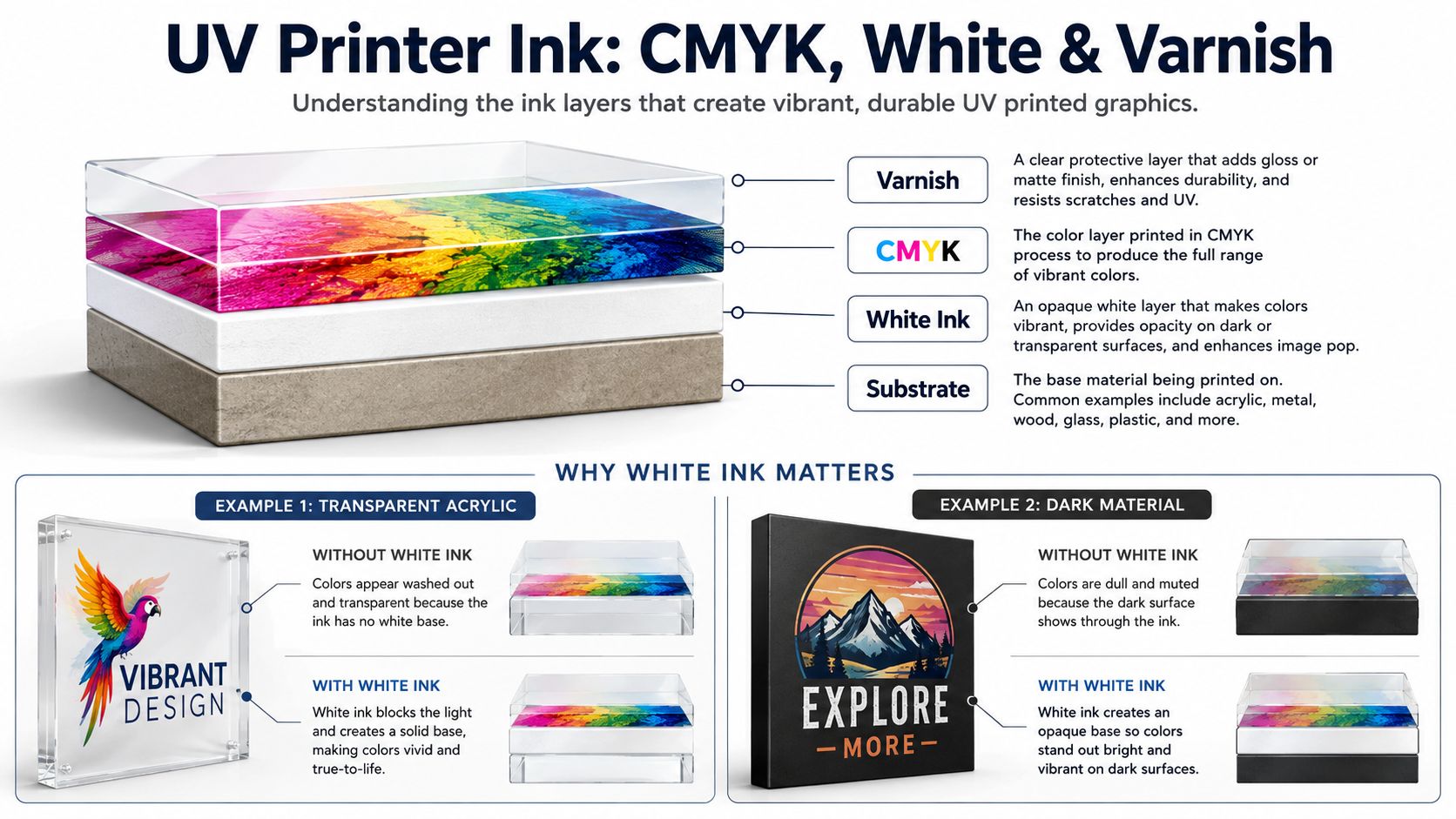
UV printers use specially formulated UV-curable inks rather than ordinary desktop inkjet inks.
A common configuration includes CMYK plus white, while some printers also support clear varnish.
CMYK Ink
CMYK refers to:
- Cyan
- Magenta
- Yellow
- Black
These inks combine to reproduce full-color images, photographs, logos and illustrations.
White Ink
White ink is one of the most important differences between many UV printing systems and ordinary desktop inkjet printers.
Imagine printing a colorful logo on clear acrylic.
Without white ink behind the color layer, light can pass through the printed image and make the colors look transparent or washed out.
A typical layer structure may therefore be:
Varnish → CMYK → White Ink → Substrate
White ink is also useful when printing on:
- Black products
- Dark plastics
- Colored metal
- Transparent acrylic
- Glass
- Other non-white surfaces
It provides an opaque base that helps the CMYK colors remain visible.
Clear Varnish
Some UV printers can also print clear varnish.
Depending on the machine, ink system and artwork, varnish may be used for:
- Spot gloss
- Decorative highlights
- Texture
- Raised effects
- Additional visual depth
Not every UV printer supports the same varnish functions, so this should be checked when comparing machines.
What Can a UV Printer Print On?
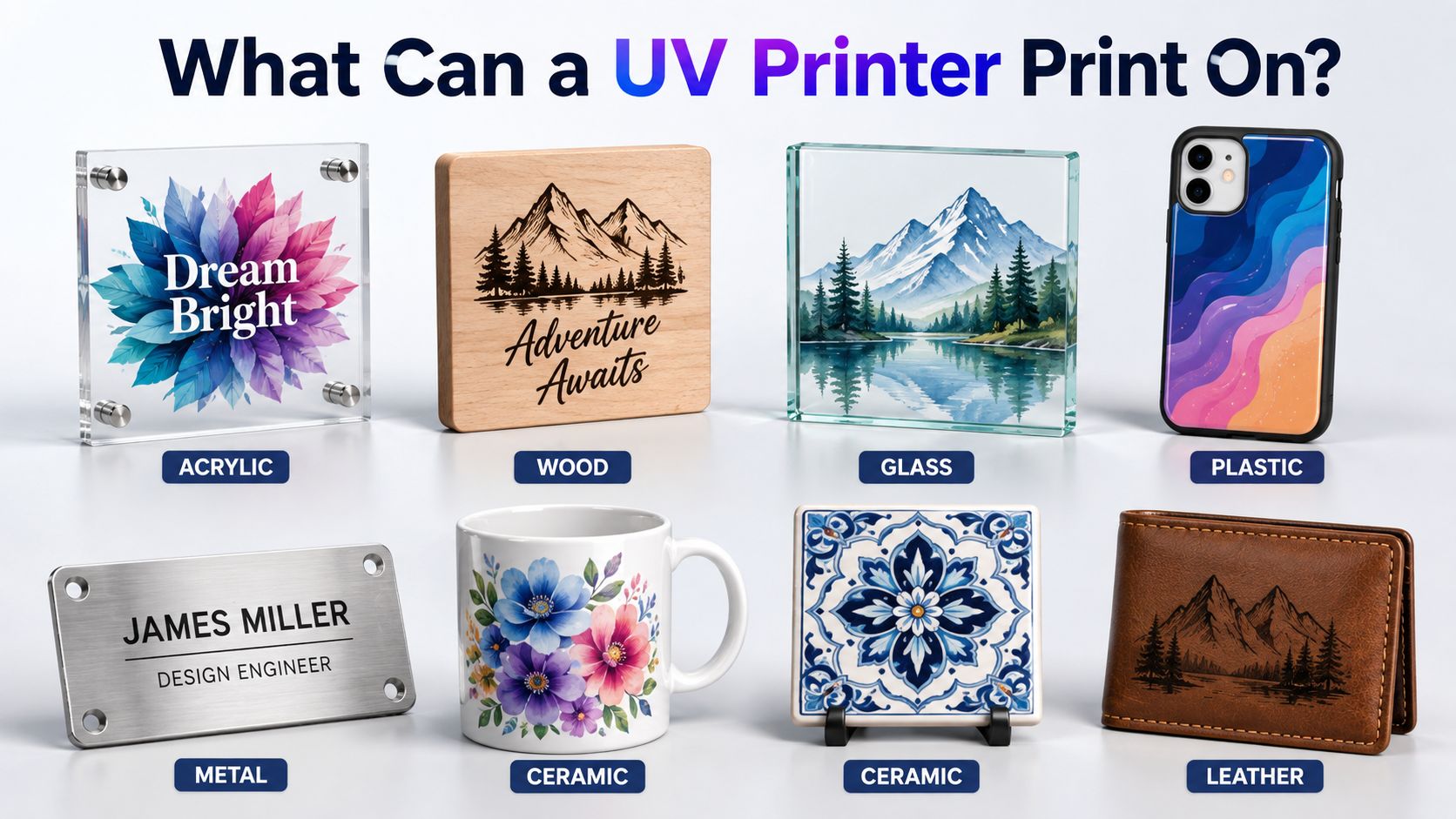
One of the biggest reasons businesses consider UV printing is the wide range of hard substrates it can potentially handle.
Common materials include:
| Material | Example Products |
|---|---|
| Acrylic | Signs, awards, display panels |
| Plastic | Phone cases, promotional items |
| Wood | Plaques, decorations, gifts |
| Glass | Decorative panels, gifts |
| Metal | Nameplates, signs, promotional products |
| Ceramic | Tiles, decorative products |
| Leather | Covers and selected accessories |
However, “a UV printer can print on a material” does not automatically mean every product made from that material will have perfect adhesion.
Print performance can also depend on:
- Surface coating
- Surface energy
- Cleanliness
- Ink formulation
- UV curing settings
- Primer
- Product texture
- Environmental conditions
Some glass, metal and plastic surfaces may require cleaning, pretreatment or primer before production.
For a commercial business, it is better to test every new blank product before selling it at scale.
What Is a UV Printer Used For?
UV printing is particularly valuable for personalized products and short-run customization.
Popular applications include:
Custom Phone Cases
Phone cases are a common UV printing application because the design can be printed directly onto the case surface.
Acrylic Signs
UV printers can combine color and white ink to create graphics on transparent or colored acrylic.
Promotional Products
Companies can customize:
- Gifts
- Promotional panels
- Branded accessories
- Keychains
- Office items
- Event products
Wood Products
Wood plaques, decorative signs and customized gifts can be printed with full-color artwork.
Metal Nameplates
UV printing can be used for selected identification plates, decorative metal items and personalized signs.
Awards and Displays
Clear acrylic and other rigid materials make UV printing useful for awards, displays and personalized presentation products.
For businesses already producing apparel with DTF, these products represent a very different customer opportunity.
UV Printer vs Regular Inkjet Printer
A UV printer and an ordinary inkjet printer both use digital printheads, but their applications are very different.
| Feature | UV Printer | Regular Inkjet Printer |
|---|---|---|
| Main ink | UV-curable ink | Dye or pigment ink |
| Ink setting | UV LED curing | Absorption or evaporation |
| Main media | Hard objects and rigid substrates | Paper and compatible media |
| White ink | Common on many systems | Usually unavailable |
| Clear varnish | Available on some systems | Usually unavailable |
| Thick products | Possible with flatbed designs | Usually unsuitable |
| Direct product printing | Major application | Limited |
An ordinary inkjet printer is primarily designed around paper or coated media.
A UV flatbed printer is designed around direct-to-object customization.
UV Printer vs DTF Printer: What Is the Difference?
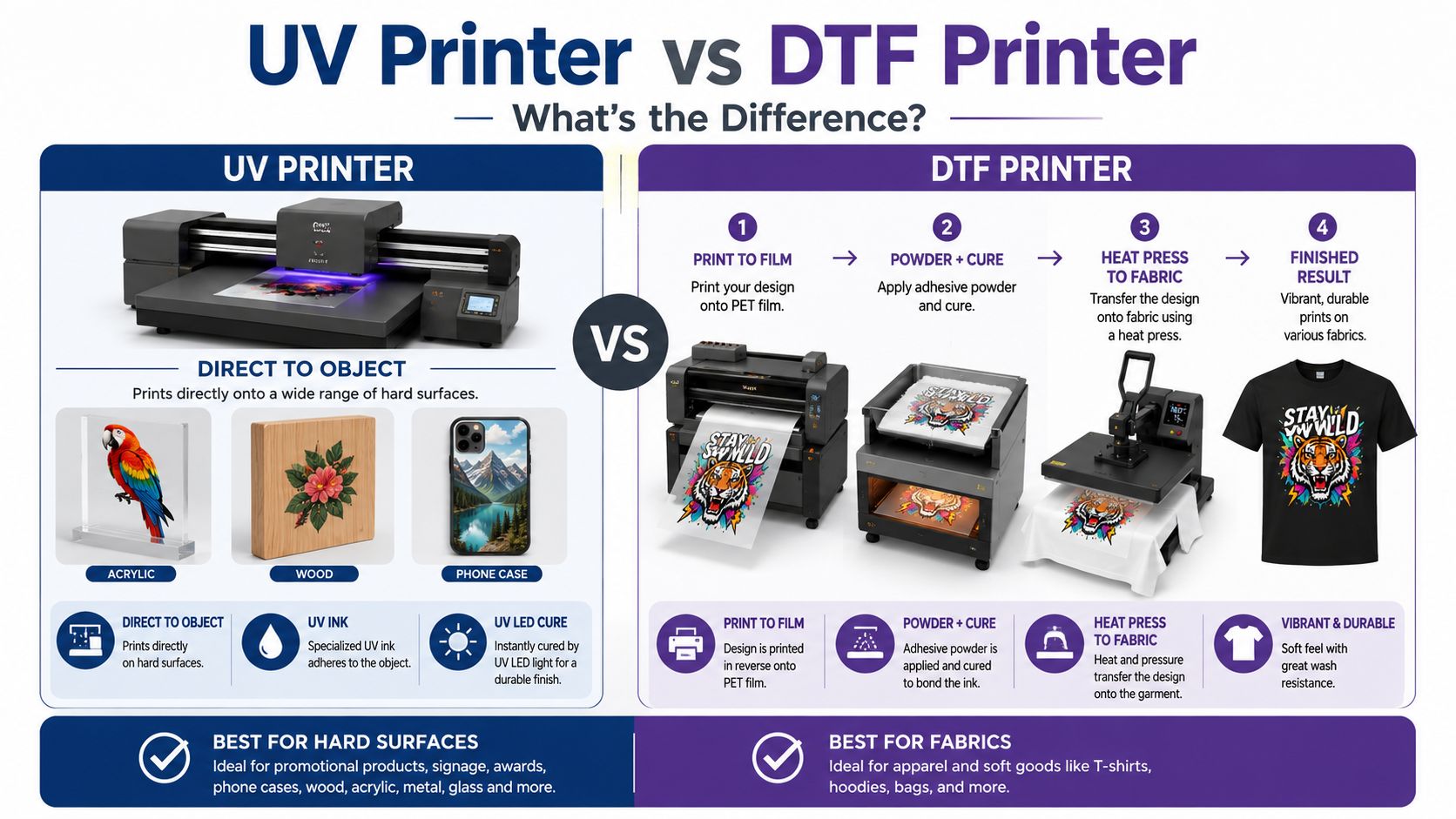
UV and DTF are both digital printing technologies, and both can use white ink, but their workflows and target products are fundamentally different.
| Feature | UV Printer | DTF Printer |
|---|---|---|
| Main application | Hard objects | Apparel and textiles |
| Printing method | Usually direct to object | Print to PET film |
| Ink | UV-curable ink | DTF pigment ink |
| White ink | Yes | Yes |
| Adhesive powder | No | Yes |
| UV curing | Yes | No |
| Heat press | Usually not required | Required for garment transfer |
| Typical products | Acrylic, wood, phone cases, signs | T-shirts, hoodies, workwear, bags |
A DTF printer first creates a transfer.
The typical process is:
Artwork → RIP → PET Film → CMYK + White → Hot-Melt Powder → Curing → Heat Press → Garment
You can see the complete process in our How DTF Printing Works guide.
UV printing is different:
Artwork → RIP → Direct Printing on Object → UV LED Curing → Finished Product
The key distinction is therefore not simply ink chemistry.
It is the entire production workflow.
UV Printer vs UV DTF vs DTF Printing
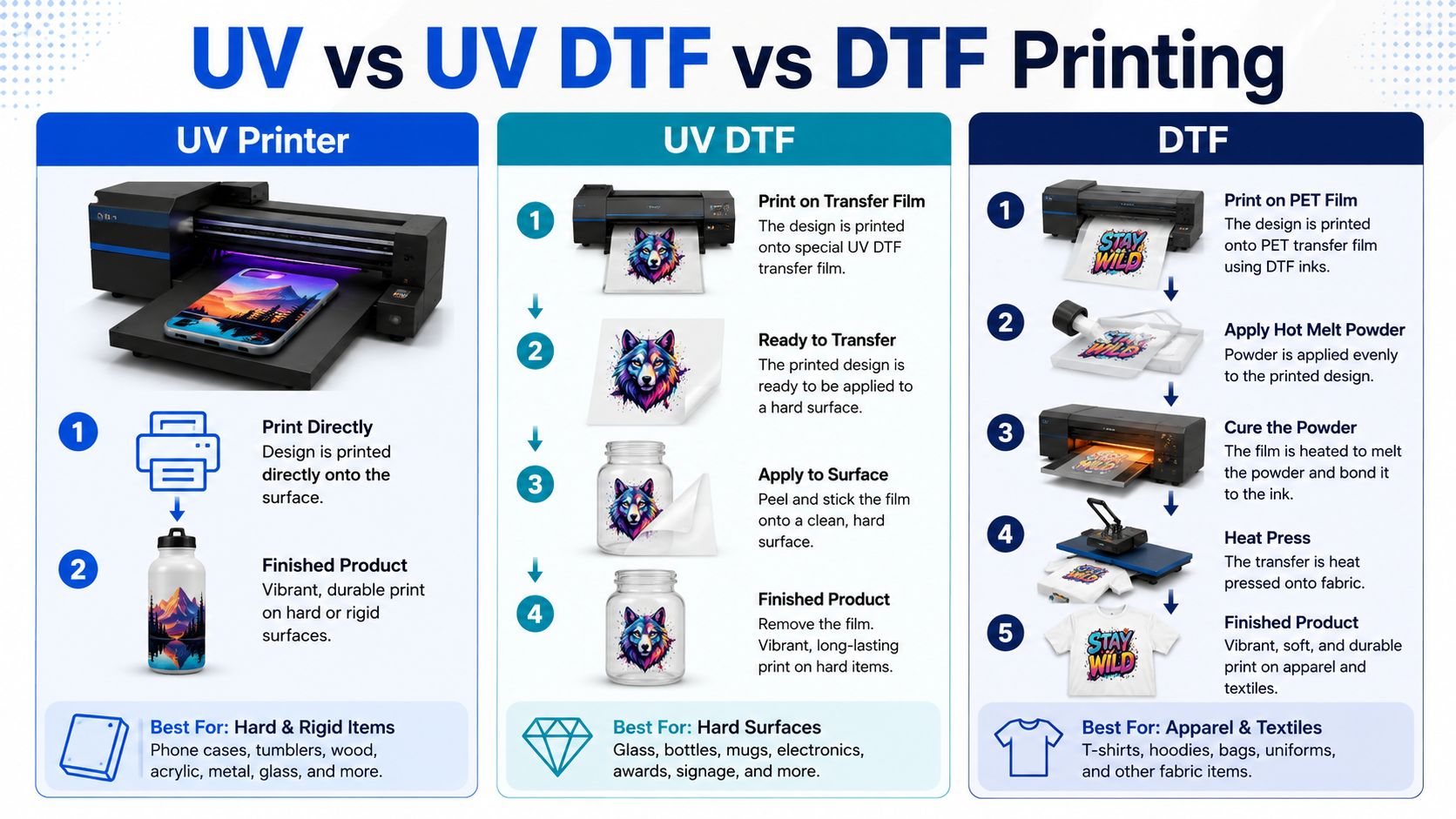
These three technologies are sometimes confused because their names sound similar.
A simple way to separate them is by asking:
Where is the image printed first, and where does the final decoration go?
UV Printing
Print directly onto the object.
Best suited to many flat or printable rigid products such as:
- Acrylic
- Wood
- Plastic
- Metal
- Phone cases
- Signs
UV DTF Printing
Print onto a special film, then transfer the image to a hard object.
This makes UV DTF particularly useful when direct flatbed printing is inconvenient, including certain:
- Bottles
- Cups
- Curved products
- Irregular hard surfaces
- Promotional goods
UV DTF is still mainly a hard-goods decoration process.
DTF Printing
Print onto PET film, apply hot-melt powder, cure the transfer and heat press it onto a textile.
DTF is commonly used for:
- T-shirts
- Hoodies
- Workwear
- Sportswear
- Tote bags
- Uniforms
- Ready-to-press transfers
For more product ideas, see our complete DTF Printing Applications guide.
Advantages of UV Printing
UV printing has several characteristics that make it attractive for customized hard goods.
Direct-to-Object Printing
Many products can be printed without first creating a separate transfer.
Fast Curing
UV LED curing significantly reduces the waiting time between printing and handling.
White Ink Support
White ink helps make color graphics visible on dark and transparent products.
Full-Color Personalization
Photographs, logos, gradients and detailed artwork can be printed digitally.
Short-Run Production
Digital workflows are well suited to:
- One-off personalization
- Samples
- Small batches
- Customer-specific artwork
- Print-on-demand products
Varnish and Special Effects
Compatible machines may add gloss or textured effects using clear ink.
Wide Product Range
A single UV printing workflow may support several types of hard goods, helping a customization business diversify its catalog.
What Are the Limitations of UV Printing?
UV printing is versatile, but it is not a universal solution.
Higher Equipment Investment
A UV printer usually represents a more specialized investment than a basic office inkjet printer.
White Ink Requires Maintenance
White pigments can settle over time.
A proper circulation, cleaning and maintenance routine is important for stable production.
Adhesion Varies by Surface
Two products both described as “plastic” may behave differently because their coatings and surface characteristics are different.
Some Products Need Primer
Glass, metal and certain plastics may require pretreatment to achieve reliable adhesion.
Flatbed Size Limits the Product
The printer’s bed size and maximum object height determine what can physically be loaded.
Irregular Objects Can Be More Difficult
Curves, large height changes and uneven surfaces can affect printhead distance and image quality.
It Is Not Primarily an Apparel Process
Although specialized UV technologies have many applications, a conventional UV flatbed printer is generally not the first choice for soft T-shirts, hoodies and other everyday apparel.
For those products, a DTF printer is normally the more relevant workflow.
How Durable Is UV Printing?
UV prints can provide good resistance to handling, moisture and normal wear when the ink, material and process are correctly matched.
But there is no single durability number that applies to every UV-printed product.
Actual performance depends on:
- Substrate
- Ink formulation
- Surface preparation
- Primer
- Curing settings
- Outdoor exposure
- Abrasion
- Cleaning chemicals
- Protective finish
- How the product is used
A decorative acrylic sign used indoors faces very different conditions from an object repeatedly handled outdoors.
This is why commercial printers should test the actual product instead of assuming that every UV print will have identical durability.
What Types of UV Printers Are There?
“UV printer” describes a technology rather than one single machine format.
Desktop UV Flatbed Printers
Compact systems designed for smaller customized products and limited workspaces.
Typical products may include:
- Phone cases
- Small acrylic pieces
- Promotional items
- Small wooden products
UV Flatbed Printers
Flatbed machines hold rigid products on a stationary bed while the print system moves across them.
UV Roll-to-Roll Printers
These machines are designed for compatible flexible roll media rather than individual rigid objects.
UV Hybrid Printers
Hybrid systems can support combinations of rigid boards and flexible media depending on machine design.
Rotary UV Printing Systems
Rotary fixtures or specialized machines can help print cylindrical products such as bottles and tumblers.
The right format depends more on the products you plan to sell than on the word “UV” itself.
Should a DTF Business Add a UV Printer?
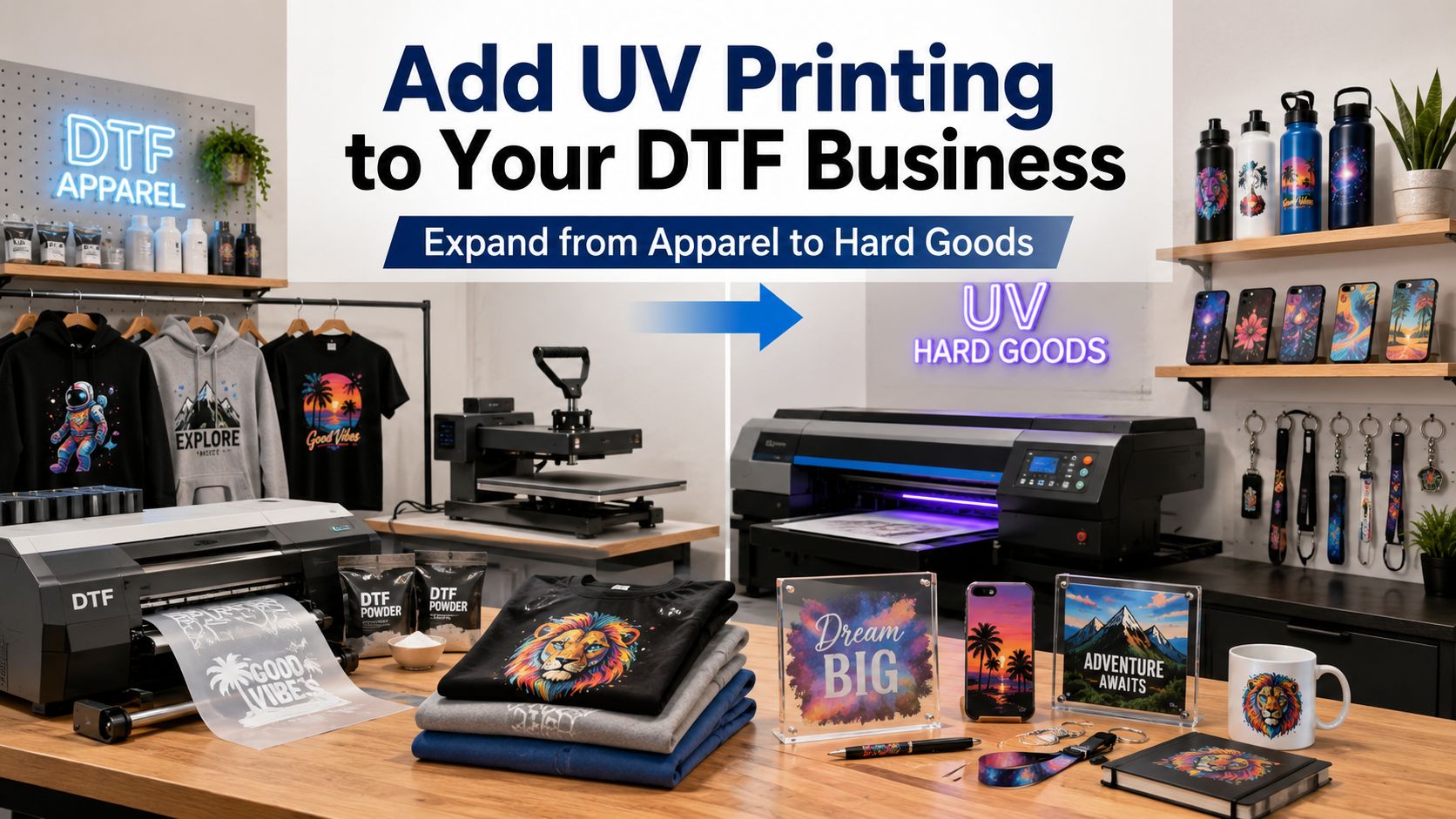
For an established DTF business, UV printing can make sense because it expands the business into a different product category rather than simply adding another apparel printer.
A DTF business may already sell:
- T-shirts
- Hoodies
- Uniforms
- Workwear
- Tote bags
- Ready-to-press transfers
Adding UV capability can potentially introduce:
- Phone cases
- Acrylic signs
- Keychains
- Personalized gifts
- Metal products
- Awards
- Promotional merchandise
- Branded hard goods
The combination creates a broader custom-product business:
DTF → apparel and textiles
UV → hard goods
This can be useful for customers who want a complete merchandise package.
For example, a local company ordering branded shirts may also need acrylic desk signs, promotional gifts or customized office products.
An event customer ordering DTF shirts may also want signs, awards or personalized merchandise.
The important question is whether your customer base actually demands those products.
Buying another printing technology only makes sense when it solves a real product or capacity need.
Should You Choose a UV Printer or DTF Printer First?
If you are starting a customization business and can only choose one printing technology, start with the products you plan to sell.
Choose DTF First If You Want to Sell:
- Custom T-shirts
- Hoodies
- Workwear
- Sportswear
- Uniforms
- Tote bags
- Apparel transfers
If this describes your business, start with our DTF Printer for Beginners guide and compare the current DTF printer options.
A compact setup can begin with smaller-format production, while an A3 DTF printer gives growing businesses more useful width for common apparel graphics.
Businesses focused on gang sheets and ready-to-press transfer production may eventually move toward 60cm DTF printers.
Choose UV First If You Want to Sell:
- Acrylic products
- Phone cases
- Wooden gifts
- Glass products
- Metal products
- Signs
- Awards
- Personalized hard goods
In that case, a dedicated UV printer is likely to fit your product range better.
Because 9DTF focuses primarily on DTF printing workflows, businesses specifically looking for direct-to-object UV equipment can also explore the wider EraSmart UV printer range.
Consider Both When Your Business Serves Multiple Product Categories
A business selling both apparel and personalized hard goods may eventually benefit from having both technologies.
But it is usually better to establish a stable workflow and customer demand in one category before adding another machine simply to expand the catalog.
UV Printer FAQ
What does a UV printer do?
A UV printer deposits UV-curable ink onto a product and uses ultraviolet LED light to cure the printed ink rapidly. Flatbed UV printers are commonly used for direct printing on rigid products such as acrylic, plastic, wood, metal, glass and phone cases.
How does UV printing work?
Artwork is processed in RIP software, the object is positioned on the printer, and the printhead deposits CMYK, white or other supported UV inks onto the surface. UV LED lamps then cure the ink as it is printed, producing a finished image directly on the product.
Does a UV printer need special ink?
Yes. UV printers require compatible UV-curable ink formulated for the printer, printhead and curing system. Ordinary desktop inkjet ink should not be substituted for UV ink.
Can a UV printer print white ink?
Many UV flatbed printers include a white-ink system. White ink is particularly useful for printing onto dark, colored or transparent substrates because it creates an opaque base underneath the color image.
Can a UV printer print on glass?
Many UV printers can print on glass, but adhesion varies according to the surface. Cleaning, pretreatment or primer may be required for reliable commercial production. A sample should always be tested before processing a large order.
Can a UV printer print on T-shirts?
A conventional UV flatbed printer is generally not the preferred technology for everyday T-shirt printing. For T-shirts, hoodies and other apparel, DTF is normally more suitable because it creates a flexible transfer that is applied to the garment with a heat press.
Does UV printing require a heat press?
Direct UV flatbed printing generally does not require a heat press. UV LED lamps cure the ink on the object. This differs from DTF printing, where the finished PET-film transfer normally needs to be applied to the garment using heat and pressure.
What is the difference between UV printing and DTF printing?
UV printing normally prints UV-curable ink directly onto hard objects and cures it with UV LED light. DTF printing creates a transfer on PET film using DTF ink and hot-melt powder, which is later heat pressed onto apparel or another suitable textile product.
Is a UV printer good for a small business?
It can be, particularly for businesses selling personalized hard goods, signs, gifts, phone cases or promotional products. The decision should be based on product demand, printer size, maintenance requirements, expected order volume and the surfaces you plan to print.
Final Thoughts: UV and DTF Solve Different Printing Problems
A UV printer is best understood as a digital direct-to-object printing system that uses UV-curable ink and UV LED curing.
Its strength is the ability to decorate a wide variety of hard products with full-color graphics, white ink and, on compatible machines, clear effects.
DTF solves a different problem.
Instead of printing directly onto the final object, DTF produces a flexible PET-film transfer that is powdered, cured and heat pressed onto apparel.
For a custom printing business, neither technology is automatically “better.”
The better choice depends on what you want to sell:
Hard goods → consider UV printing.
Apparel and textile products → consider DTF printing.
A wider personalized-product business → the two technologies can complement each other.
If your main goal is apparel, start by comparing 9DTF DTF printers, learning how DTF printing works, and matching the printer size to the products and production volume you actually expect to handle.
